Today FREE APP is ebay Valet.
Valet - from Wikipedia - means terms for male servants who serve as personal attendants to their employer.
Just think Valet parking, and that's ebay valet.
All you need to do is just register your item to ebay valet, and it will do the rest for you to sell your items.
Unlike valet parking where you must pay 'extra', ebay Valet is FREE.
The Apple AppStore download link is here:
https://itunes.apple.com/us/app/ebay-valet-sell-for-me.-turn/id871975291?mt=8
For other FREE APPS and/or FREE GAMES, visit:
http://dailyfreeapps4iphone.blogspot.com/
To bookmark this page:
Ctrl + D on Windows
Command + D on Mac
or check the bookmark menu/star icon on your mobile browser
Everything About Apple iPhone, iPad, iPod and iOS devices. Free iPhone Apps and Games daily, Free iPhone Tips and Tricks, Free iPhone News
Showing posts with label app. Show all posts
Thursday, June 26, 2014
Wednesday, June 18, 2014
[FREE APP] [iOS] SLINGSHOT By Facebook | Facebook's Slingshot
Today FREE APP is a new app for sharing photos from Facebook, named Slingshot.
It is pretty much similar to the already famous photo-sharing app, Snapchat.

Here is the Apple AppStore download link:
https://itunes.apple.com/app/id878681557
After installing the app and when first time open, it will grant you will the following messages:


Yes! pretty much the same as Snapchat, except in Slingshot, it requires us, the user, to have something in return, photos/videos to able to see photos/videos from someone else.
In order to able using the app, you will need to provide your contact number which is according to the privacy policy is used for searching your friends and for your friends to search you via the contact number.
Other than contact number, you can also use your facebook account to find friends and for friends to find you or you can send sms to them asking to join Slingshot.
After providing the contact number, Facebook will send a SMS to it to confirm the number, so you will need to provide a correct contact number.
Contact number is a requirement to start with.

Terms and conditions, is using the same terms and conditions from Facebook.com

While the privacy policy is from Slingshot website sling.me.

Confirmation code sent by Facebook.

Slingshot main interface is the camera app with options to use flash and selfie.
Click on the selfie button to take selfie photos with the front camera.
First time, you will only have Slingshot crew as your friend.
And you have 3 items locked waiting you.
As what the "feature" says, you need to send the sling first before able to your someone sling
So take photos/videos, then send him your sling.
Once sent, now the locked items will be available for you to see.
Some options available:
Pros and cons for version 1.0.1
Pros:
Cons:
Slingshot crew videos and photos:


Push Notification.


Draw Something!

It is pretty much similar to the already famous photo-sharing app, Snapchat.
Here is what the icon look like on the home screen:

Here is the Apple AppStore download link:
https://itunes.apple.com/app/id878681557
After installing the app and when first time open, it will grant you will the following messages:


Yes! pretty much the same as Snapchat, except in Slingshot, it requires us, the user, to have something in return, photos/videos to able to see photos/videos from someone else.
In order to able using the app, you will need to provide your contact number which is according to the privacy policy is used for searching your friends and for your friends to search you via the contact number.
Other than contact number, you can also use your facebook account to find friends and for friends to find you or you can send sms to them asking to join Slingshot.
After providing the contact number, Facebook will send a SMS to it to confirm the number, so you will need to provide a correct contact number.
Contact number is a requirement to start with.

Terms and conditions, is using the same terms and conditions from Facebook.com

While the privacy policy is from Slingshot website sling.me.

Confirmation code sent by Facebook.

Slingshot main interface is the camera app with options to use flash and selfie.
Click on the selfie button to take selfie photos with the front camera.
First time, you will only have Slingshot crew as your friend.
And you have 3 items locked waiting you.
As what the "feature" says, you need to send the sling first before able to your someone sling
So take photos/videos, then send him your sling.
Once sent, now the locked items will be available for you to see.
Some options available:
- Share location on photos
- Get notifications when someone slings you
- Enable sync phone contacts
Pros and cons for version 1.0.1
Pros:
- Nothing really fancy, pretty much the same as Snapchat, but the feature that disallowing people to see your shot unless the send something in return is good so at least you know that you will get reply if they want to see your shot.
Cons:
- Only available for iOS 7 and up. Those using 3GS and below will not be able to use this app.
Slingshot crew videos and photos:


Push Notification.


Draw Something!
Sync phone contacts prompt.

Tuesday, June 17, 2014
[FREE APP] [iOS] FIFA WORLD CUP 2014 BRAZIL
"You can take the World Cup everywhere you go" that's what this app is all about.
The Apple AppStore download link:
After installing, here is the icon look like at home screen:
The Logo:

First time opening the app, it will ask you for access to your location, so that it can adjust the time to your local time.
The FIFA Official App also ask permission to send push notification.
The push notification:
FIFA Official App menus and features:
- Live
- News
- Teams
- Standings
- Awards
- Destinations
- Statistics
- Games
You can also choose favorite team to follow.
Don't worry, even after confirmation, you can change and even add your favorite team to follow.
You can customize the alerts such as: Full time results, Line-ups, Kick-off, Goals and even red card.
You can choose and add favorite teams to follow.
Live Menu. Unfortunately there is no options to watch the world cup for FREE here.
The Live menu only shows you what's the live match currently with all the descriptions and events happening during the game.
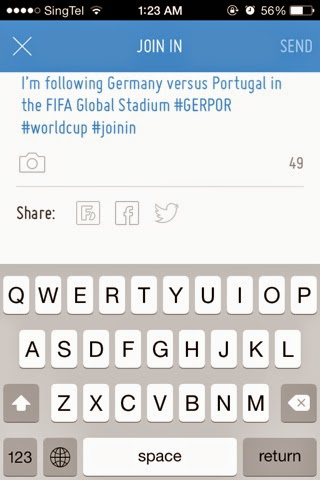
You can also share the live match to social media such as Twitter and Facebook.
News Menu. Tap to see the news.
Teams menu. Here you can find all the participating teams and their FIFA ranking.
Standings Menu. Here you can find standings for all the groups and teams.
Awards Menu. All the awards available, such as Golden Ball and Golden Boot.
Destination menu. This menu is showing about the host country, including cities and stadiums.
Statistics Menu. Unfortunately when I tried accessing this menu, it returned me with "Information currently not available". I guess they still working on this part.
Social. This shows all the total mentions shouted to the world.
Games Menu. Few games are available, such as McDonald's FIFA World Cup Fantasy where your goal is to build your fantasy dream team.
The left-side menu:

All I can say about this app is, this FIFA Official App: FIFA World Cup 2014 Brazil is heaven for world cup enthusiast.
Labels:
2014,
app,
brazil,
fifa,
fifa 14,
fifa official app,
free,
free app,
free world cup,
ios,
iPad,
iphone,
world cup,
world cup 2014
Friday, June 13, 2014
[FREE APP] [iOS] UNIQLO Wake Up - Wake up with music that changes with the weather
Today FREE APP is UNIQLO Wake Up App.
This App, I believe, will be permanently free.
UNIQLO, even though its main business is selling clothes, is now making so many free apps that does not have any relation to selling clothes.
One of the free app is UNIQLO Wake Up.
Here is the icon look on iOS:
This app has quite standard features for an clock/alarm app. It even almost the same as iOS Stock Clock App, except this app has World wide menu and a nice alarm song! Continue reading to find out more.
It has 4 main menus:
Simply to shows what time it is now. First time opening the app after installing, it will ask to have permission to your location, this is needed to detect 2 things, the local time and the weather at current location.
Alarm Menu
To set an alarm. This is what makes the app is different from many of clock/alarm app.
When the alarm is ringing, the app will detect your current location and grab the weather information.
Then it will sing for you like this, my alarm is set at 6.30am and partly cloudy: "Good morning, it is 6.30am and the weather is partly cloudy".
When the time is moving from 6.30am to 6.31am and I didn't snooze or dismiss the alarm, it will sing the new time: "Good morning, it is 6.31am and the weather is partly cloudy".
World wide menu
I'm still not quite get what's this menu does, but from what I saw, it shows you peoples from all over regions, america, europe, africa, asia, australia with their own time or perhaps alarm time.
Settings menu
In the settings menu, the following can be configured:
https://itunes.apple.com/us/app/uniqlo-wake-up/id515839388?mt=8
One thing this app (and other Alarm app) lacks of:
The app must be always opened or stay in the background.
If the app is killed/clean from the taskbar, then the alarm won't sound at the time it should ring the alarm.
This App, I believe, will be permanently free.
UNIQLO, even though its main business is selling clothes, is now making so many free apps that does not have any relation to selling clothes.
One of the free app is UNIQLO Wake Up.
Here is the icon look on iOS:
This app has quite standard features for an clock/alarm app. It even almost the same as iOS Stock Clock App, except this app has World wide menu and a nice alarm song! Continue reading to find out more.
The app greetings:
It has 4 main menus:
- Clock menu
- Alarm menu
- World wide menu
- Settings menu
Simply to shows what time it is now. First time opening the app after installing, it will ask to have permission to your location, this is needed to detect 2 things, the local time and the weather at current location.
Alarm Menu
To set an alarm. This is what makes the app is different from many of clock/alarm app.
When the alarm is ringing, the app will detect your current location and grab the weather information.
Then it will sing for you like this, my alarm is set at 6.30am and partly cloudy: "Good morning, it is 6.30am and the weather is partly cloudy".
When the time is moving from 6.30am to 6.31am and I didn't snooze or dismiss the alarm, it will sing the new time: "Good morning, it is 6.31am and the weather is partly cloudy".
World wide menu
I'm still not quite get what's this menu does, but from what I saw, it shows you peoples from all over regions, america, europe, africa, asia, australia with their own time or perhaps alarm time.
Settings menu
In the settings menu, the following can be configured:
- Location > to detect automatically your location or to set to certain location manually
- Alarm music vocals > to set the music vocals to English, mandarin or without any vocals
- Temperature > to select between Celsius or Fahrenheit
- Social media > to share the stuff to Facebook, twitter or other social media
https://itunes.apple.com/us/app/uniqlo-wake-up/id515839388?mt=8
One thing this app (and other Alarm app) lacks of:
The app must be always opened or stay in the background.
If the app is killed/clean from the taskbar, then the alarm won't sound at the time it should ring the alarm.
Labels:
alarm,
app,
clock,
free,
free app,
free ios app,
gratis,
ios,
iPad,
iphone,
social media,
uniqlo,
uniqlo wake up,
wake up
Subscribe to:
Posts (Atom)